
Inkfox AI logoInkfox AIInkfoxAI
HomeGallery
Up to 33%Pricing
  • Home
  • Image
    • Text to Image
    • Image to Image
    • Background Remover
    • Image Upscaler
    • Merge Images
    • Background Changer
    • Photo Restoration
    • Watermark Remover
    • Virtual Try On Glasses
    • Virtual Try On Sunglasses
    • Logo Generator
    • Anime Generator
    • Coloring Page
    • Headshot Generator
    • Sticker Generator
    • Product Photo
  • Video
    • Text to Video
    • Image to Video
    • Video to Video
    • Old Photo Video
    • Hug Video
    • Product Video
    • Kiss Video
    • Wedding Video
    • Real Estate Video
    • Food Video
    • Travel Video
    • Portrait Video
    • Baby Dance Video
  • Models
    • Inkfox AI Basic
    • Inkfox AI Pro
    • Inkfox AI Max
    • GPT Image 2.0
    • Nano Banana 2.0
    • Nano Banana
    • Seedream 4.0
    • Seedream 4.5
    • Seedream 5 Lite
    • GPT Image 1.5
    • Z-Image
    • Flux 2 Pro
    • Wan 2.7 Image Pro
    • Inkfox AI Pro
    • Inkfox AI Max
    • HappyHorse 1.0
    • Seedance 2.0
    • Gemini Omni
    • Grok Imagine 1.5
    • Grok Imagine
    • Veo 3.1
    • Kling 3.0
    • Runway
    • Hailuo 02
    • Wan 2.7
    • Hailuo 2.3
    • Seedance v1
    • Kling 2.6
    • Wan 2.6
  • Gallery
  • Pricing
  • Blog
    Guides and launch notes
    Feature Requests
    Vote on what ships next
    FAQ
    Usage, pricing, and account answers
Inkfox AI logoInkfox AIInkfoxAI

Scene video generator

Free AI Old Photo Video Generator

Bring a still memory into motion without turning it into a gimmick. Start with a clear old photo, describe restrained movement, then compare models before exporting the best clip.

Upload an old photoImage to video workspaceFree to start
Creation mode
Optional · Drop or Paste0/2000
Guest results stay in this browser. Sign in from a result to keep it and remove the watermark.
Public

Old photo to video

Input quality control

Inkfox AI treats old-photo animation as a careful image-to-video workflow. The source photo stays at the center: face shape, clothing, paper grain, age marks, and lighting should remain recognizable. The prompt should keep the camera locked and add small human cues such as breathing, blinking, eye contact, a mild smile, or tiny head movement. Use a portrait, family scan, wedding photo, or childhood snapshot, then decide motion and export.
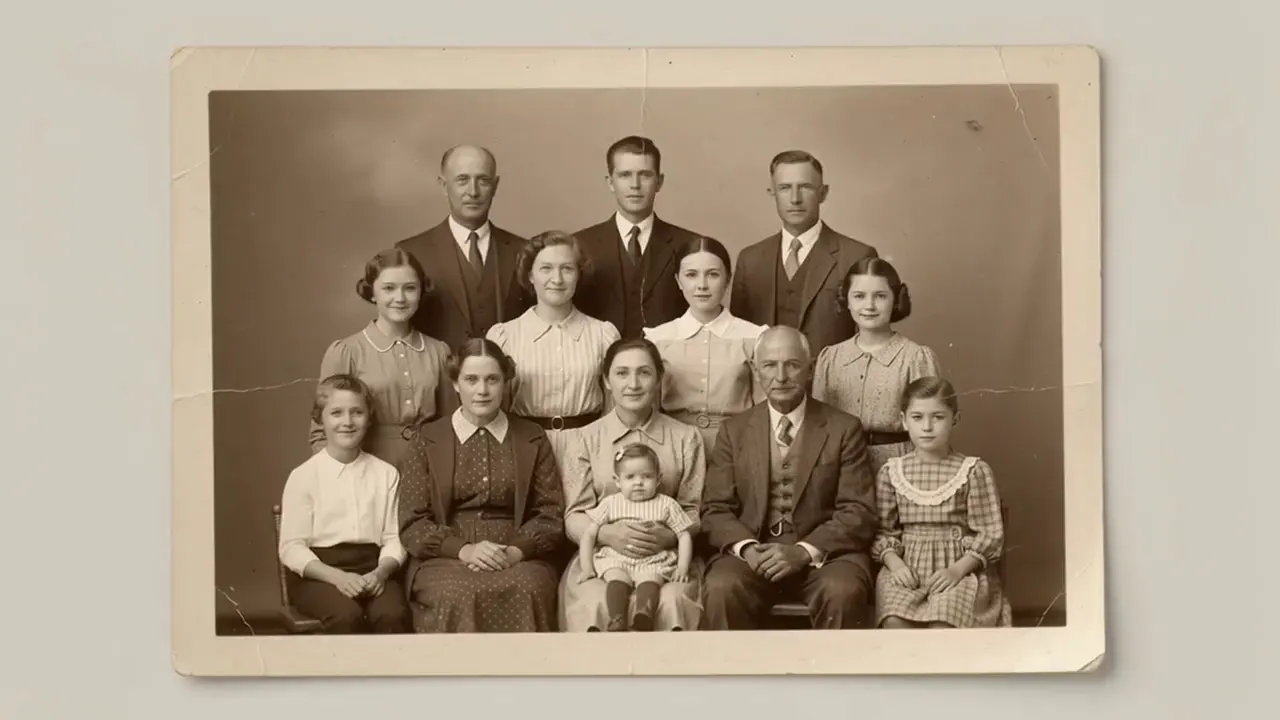
Old family portrait prepared for AI animation

Frame worth animating

Family portraits

Add breathing, a gentle blink, or a small smile while keeping the subject recognizable.

Upload an old photo

Check the frame before you add motion

Use a portrait, family scan, wedding photo, or childhood snapshot. Lock the subject, light, and background first, then ask the model for one readable action.

Keep the person, product, or space readable; avoid occlusion, low light, and harsh crops.
Write one core motion first, then add camera, lighting, and aspect ratio.
After generation, check identity, edges, hands, and background stability first.

Direction guide

Motion and output decisions

Do not turn the page into a model catalog. The useful part is telling people what to keep stable, what motion to restrain, and which export direction fits the channel.

What changed from the old video-site page

Camera, motion, and export have to be decided together. Once you define who moves, how the camera moves, and where the clip will be used, the long-tail content actually helps generation.

If the subject is not readable, switch the frame before adding prompt detail.

Write one core motion cue and let camera pacing do the rest.

The destination channel decides aspect ratio, pacing, and end hold.

Decision axis

Product role

Keep this stable

A focused Inkfox image-to-video scene connected to the current model workspace.

Watch for drift

A legacy standalone video landing page with old brand framing.

Decision axis

Prompt style

Keep this stable

Subtle, controllable motion that protects identity and photo texture.

Watch for drift

Overpromising restoration, viral hooks, or exaggerated movement.

Decision axis

Navigation

Keep this stable

A retained scenario page that points users back into image tools, upscaling, and model comparison.

Watch for drift

A keyword cluster of thin old-photo subpages.

Channel recipes

Channel-ready recipes

The same workspace can serve different publishing jobs. Instead of repeating generic use cases, turn each route into a recipe with a frame goal, motion focus, and a prompt you can reuse.

Old family portrait prepared for AI animation

Portrait prompt

Recipe 01

Family portraits

Add breathing, a gentle blink, or a small smile while keeping the subject recognizable.

Motion cue

A focused Inkfox image-to-video scene connected to the current model workspace.

Avoid drift

A legacy standalone video landing page with old brand framing.

Prompt recipe to paste into the workspace

Preserve identity and photo grain, locked camera framing, natural breathing, gentle blink, soft eye contact, small warm smile, tiny head movement, no face changes.

Return to the workspace
Restored old couple photo before animation

Group prompt

Recipe 02

Restored scans

Use upscaling or cleanup first, then generate motion from the improved frame.

Motion cue

Subtle, controllable motion that protects identity and photo texture.

Avoid drift

Overpromising restoration, viral hooks, or exaggerated movement.

Prompt recipe to paste into the workspace

Keep everyone recognizable in the original framing, subtle breathing and blinking from the visible faces, soft ambient light, tiny head movement, static camera, no new people.

Return to the workspace
Old family memory clip preview

Restored scan prompt

Recipe 03

Memory reels

Create a quiet clip for family messages, memorial screens, or personal archives.

Motion cue

A retained scenario page that points users back into image tools, upscaling, and model comparison.

Avoid drift

A keyword cluster of thin old-photo subpages.

Prompt recipe to paste into the workspace

Use the restored frame as source, preserve paper texture, subtle eye movement, calm expression, archival warm tone.

Return to the workspace

FAQ

Free AI Old Photo Video Generator FAQs

Source images, prompts, exports, and usage rights

What source photo works best?

Use a photo where the face, eyes, and mouth are visible. Small group photos can work, but large group photos with tiny faces are harder to keep stable.

Should I restore or upscale the photo first?

If the scan is blurry, scratched across the face, or very low resolution, upscale or clean it first. A cleaner first frame usually produces steadier motion.

What motion should I ask for?

Ask for restrained subject movement: breathing, blinking, eye contact, a small smile, or tiny head motion. Keep the camera and crop locked, especially when preserving identity matters.

Are old family photos private?

Uploads are used for generation and account history. Avoid uploading images you do not have rights to use, and delete generated assets from your account when you no longer need them.

Ready with Inkfox AI

Bring this scene into the Inkfox workspace

Upload a source image, keep the prompt direction, then choose model, ratio, duration, and export settings.

Open video workspaceView Gallery
Inkfox AI logoInkfox AIInkfoxAI

Free Unlimited AI Image Generator — no sign-up required.

Inkfox AI is a free AI image and video generator for text to image, image-to-image editing, reference image creation, background removal, image upscaling, text-to-video, image-to-video, and multi-model visual generation.

Company
  • About
  • Contact
  • Transparency
  • Status
Legal
  • Cookie Policy
  • Privacy Policy
  • Terms of Service
© 2026 Inkfox AI. All Rights Reserved.Sitemap