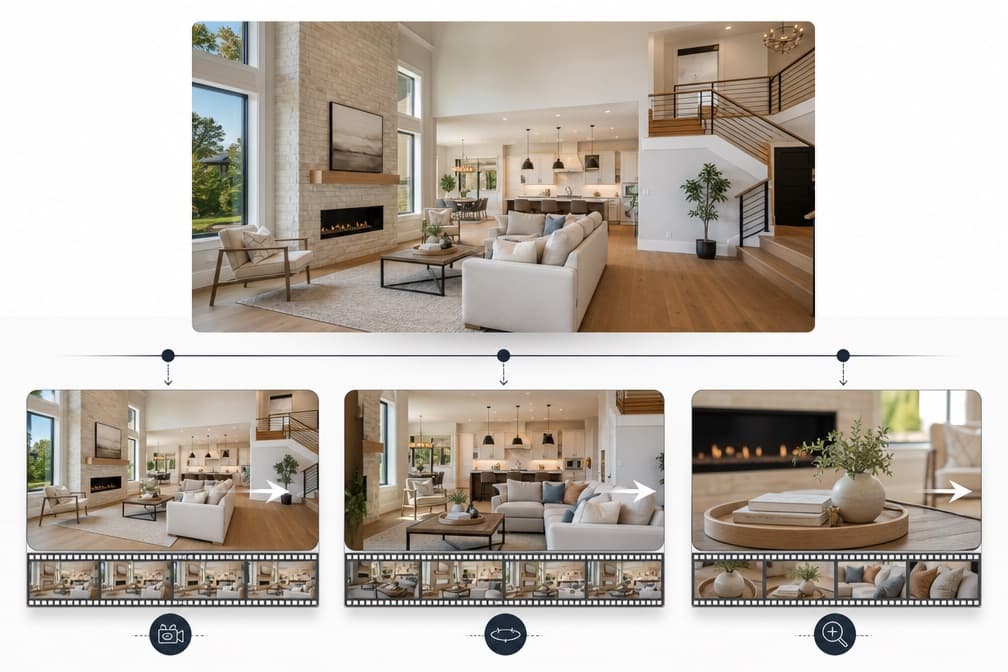
A static photo grid documents a home, while a short video can present the same images as a guided sequence. Producing original video for every listing can be difficult for agents handling rentals, entry-level homes, or quick turnarounds.
That is where an AI real estate video generator earns its keep. Used carefully, it can turn a handful of accurate listing photos into a short, motion-rich walkthrough that feels like a real tour, without inventing rooms the buyer will not actually find on site.
This guide walks through how to do that responsibly with InkFox, including photo selection, shot order, camera motion, prompt examples, a shot list, common failure modes, and an export checklist. It is written for agents, property marketers, and small brokerages who already have listing photos and need a short video that helps the property, not one that gets a complaint filed against the license.
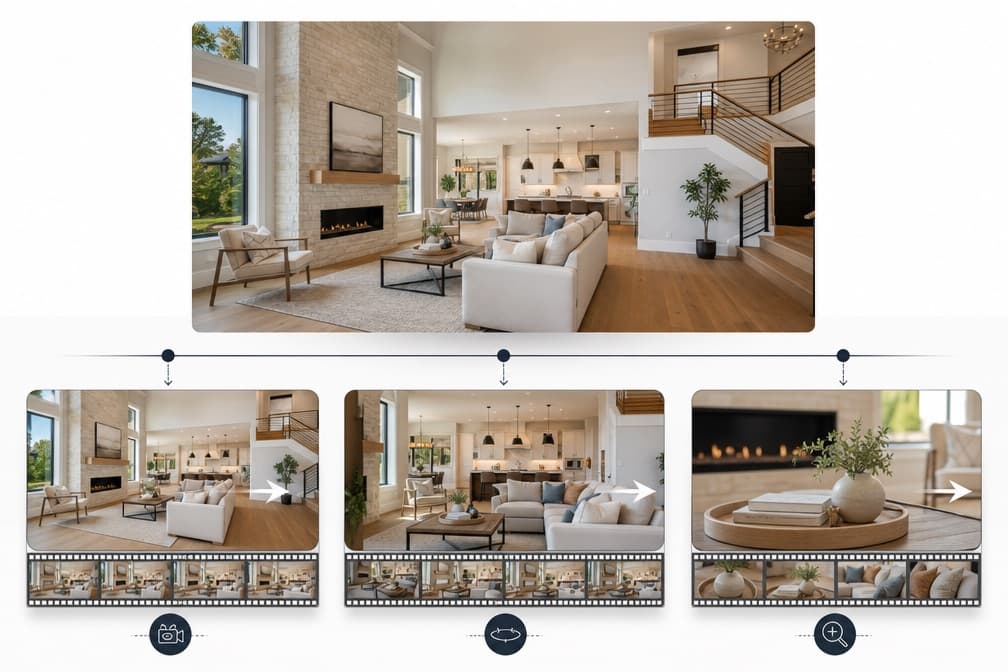
To turn listing photos into an honest video with AI:
- Pick five to eight photos that truthfully represent the property, ordered exterior to interior.
- Animate each photo one at a time in an AI real estate video generator such as the AI real estate video generator or the general image-to-video workspace.
- Use restrained camera motion (slow push, gentle pan, subtle parallax). Avoid motion that would require the model to invent unseen rooms.
- Keep the original room geometry, materials, fixtures, and defects intact. Do not remove or enhance them.
- Assemble the clips in order, add a short caption or address card, and export a vertical version for social and a horizontal version for MLS-adjacent channels.
- Disclose that the video was created from still photos with AI motion, and check your local MLS and brokerage rules before publishing.
The rest of this article is the long version.
A listing photo already contains the truth of the property at a moment in time. Good AI motion tools do not try to reimagine the room. They interpret depth, add plausible parallax, and drive a virtual camera through the scene. Done well, the output feels like a slow drone or gimbal pass, not a generative fantasy.
That is the mental model to hold. You are not asking the AI to design a home. You are asking it to add believable camera motion to a photo you already trust.
This matters legally. The National Association of Realtors has warned that altered listing imagery, including AI-enhanced photos, can create misrepresentation risk if it changes what a buyer would reasonably expect to find on site. Their guidance on the topic is a useful read before you publish anything: using AI to enhance listing photos can be legally risky. The safe path is to animate, not fabricate, and to disclose the use of AI motion in the caption or listing description.
Fewer, better photos beat a long slideshow. For most homes, five to eight clips is enough for a 20 to 40 second video.
Choose photos that:
- Were taken during this listing cycle, not stock or older marketing photos.
- Show the actual condition of the home, including honest lighting.
- Are sharp, well exposed, and shot at a natural focal length. Ultra-wide shots that already exaggerate room size will look worse once motion is added.
- Represent the rooms a buyer cares about: exterior, main living space, kitchen, primary bedroom, primary bathroom, and one differentiator (yard, view, office, finished basement).
Avoid:
- Photos with heavy virtual staging unless you clearly disclose it.
- Photos where defects were edited out. If the AI adds motion to a doctored still, you are compounding a misrepresentation, not fixing one.
- Photos that show neighboring properties, license plates, or people you do not have permission to feature.
The most reliable narrative order for a listing video is the order a real buyer would experience the home.
A dependable sequence looks like:
- Exterior wide (front elevation with address context).
- Entry or foyer.
- Main living area.
- Kitchen.
- Primary bedroom.
- Primary bathroom.
- Differentiator (yard, view, office, garage, or finished lower level).
- Exterior closing shot (rear yard or dusk shot if you have one).
This order matters because AI motion is applied per clip. If you jump around, the viewer will feel it. Exterior to interior mimics an in-person showing and gives the video a natural arc.
The biggest mistake agents make with an AI real estate video generator is asking for too much motion. Aggressive dolly-ins, whip pans, and orbits force the model to guess at geometry it cannot see, which is exactly where invented walls, warped cabinetry, and impossible sightlines appear.
Safe motion choices for real estate:
- Slow push in (about 5 to 10 percent zoom over the clip).
- Slow pull back (useful for reveals of open-plan spaces).
- Gentle horizontal pan (no more than 10 to 15 percent of the frame).
- Subtle parallax with a nearly still camera.
- Very slow vertical tilt for tall features (fireplaces, double-height ceilings).
Motion choices to avoid:
- Orbits or 360 moves around furniture. The model will invent the back side.
- Fly-throughs into hallways or doorways. The model will hallucinate the next room.
- Fast zooms that stretch textures and distort fixtures.
Before you approve any clip, compare it to the source photo full screen. You are checking that the AI did not silently change the property.
Watch specifically for:
- Room geometry. Straight walls should stay straight. Corners should stay at the same angle. Ceiling height should not appear to grow.
- Materials. Hardwood should not turn into tile. Quartz should not turn into marble. Carpet should not shift color.
- Fixtures. Faucets, light fixtures, cabinet pulls, outlets, and appliances should stay the same brand style and finish.
- Windows and views. The view out the window should not become more scenic than reality.
- Defects. Scuffs, aging trim, older appliances, and visible wear should remain if they were in the source photo.
If any of these drift, regenerate the clip with less motion, or accept the still and use a soft Ken Burns effect instead of AI motion for that frame.
Prompts for a listing video should sound more like a cinematographer's shot note than a creative brief. You are telling the tool what camera to use, not what to imagine.
Prompt examples you can adapt:
- "Slow forward dolly, roughly 8 percent push in, static horizon, preserve wall angles and cabinet edges. No new furniture. No new rooms."
- "Gentle left to right pan, about 10 percent of frame, subtle depth parallax, keep window view unchanged."
- "Static wide with light parallax, no zoom, preserve floor material and light fixture. Cinematic but restrained."
- "Slow pull back reveal, 10 percent zoom out, keep ceiling height and doorway proportions identical to source photo."
- "Very slow upward tilt on fireplace, 5 percent, preserve stone texture and mantel details."
Notice what these prompts do not do. They do not ask the tool to "make it feel luxurious," "improve the lighting," or "make the kitchen brighter." Those are the prompts that get you into disclosure trouble.
| # | Source photo | Motion | Length | Prompt intent |
|---|
| 1 | Exterior front | Slow push in | 3 to 5 s | Establish home, address, curb appeal |
| 2 | Foyer or entry | Static with parallax | 2 to 3 s | Set interior tone |
| 3 | Main living area | Gentle pan | 4 to 5 s | Show scale and flow |
| 4 | Kitchen | Slow pull back | 4 to 5 s | Reveal counters and layout |
| 5 | Primary bedroom | Slow push in | 3 to 4 s | Warmth and comfort |
| 6 | Primary bathroom | Static with parallax | 2 to 3 s | Finish quality |
| 7 | Differentiator (yard or view) | Very slow tilt or pan | 4 to 5 s | Emotional close |
| 8 | Exterior rear or dusk | Slow push in | 3 to 5 s | End on the home itself |
Total run time lands around 25 to 35 seconds, which fits vertical social formats and short MLS-adjacent clips.
| Symptom | Likely cause | Fix |
|---|
| Walls curve or lean during motion | Push or pan too aggressive | Reduce motion, regenerate |
| Cabinet or trim details morph | Model guessing occluded geometry | Switch to static parallax only |
| Countertop material changes mid-clip | Prompt allowed style drift | Add "preserve material and finish" and reduce zoom |
| View out window becomes more dramatic | Model treated window as generative area | Regenerate with "keep window view unchanged" |
| New furniture appears | Prompt too open | Add "no new furniture, preserve source composition" |
| Room appears larger than reality | Wide source plus zoom out | Use a tighter source photo or remove the pull back |
| Fixtures change style | Motion pushed past what depth allows | Shorten clip, reduce motion, or use the still with a soft Ken Burns |
If a clip fails twice on the same photo, that photo is probably not a good candidate for AI motion. Use it as a static frame instead.
Once each photo has a clean animated version, assembly is straightforward.
- Import the clips into your editor of choice in the exterior-to-interior order above.
- Trim each clip so the motion feels intentional. Cut before the AI starts to strain.
- Add short cross dissolves (about 200 to 400 ms) between clips. Hard cuts also work if the pacing supports it.
- Add a simple address card at the start or end. Include price and agent contact if your MLS allows it in video assets.
- Add restrained background music. Avoid tracks that force fast cuts.
- Add captions for silent autoplay. Most social viewers will not turn sound on.
If you want to keep everything in one place, both the dedicated AI real estate video generator and the broader image-to-video workspace support animating individual photos, which you can then stitch in any editor.
Before you publish, run through this list:
- Vertical export (9:16) for Reels, Shorts, and TikTok.
- Horizontal export (16:9) for YouTube, embeds, and some MLS-adjacent channels.
- Square export (1:1) if your brokerage still uses feed-style posts.
- Captions burned in or provided as a sidecar file.
- Address, price if permitted, and agent identification.
- A short disclosure line in the caption noting that the video was created from still photos with AI-generated motion.
- Confirmation that no photo used in the video was altered to hide defects or change fixtures.
- A quick review against your local MLS rules and your brokerage compliance guidance.
Treat the AI real estate video generator like any other listing tool. It has to serve the buyer's ability to make an informed decision. That means:
- Do not invent rooms, hallways, or outdoor areas that are not in the source photos.
- Do not change permanent fixtures such as flooring, cabinetry, countertops, or built-ins.
- Do not remove defects, stains, cracks, or wear that a buyer would see on site.
- Do not exaggerate views, yard size, or natural light beyond what the source photo shows.
- Do not imply dimensions the property does not have.
Disclose in plain language that the video was assembled from still photos with AI motion. Buyers appreciate the honesty, and it is the position that ages best if a complaint or claim ever surfaces. The NAR guidance linked earlier is a good reference to share with a broker or compliance lead if you are formalizing an internal policy.
No. It creates believable camera motion on top of still photos you provide. It does not see hallways, closets, or rooms that are not in your source images, and it should not be asked to invent them.
For a concise social edit, the sample shot list above produces roughly 20 to 40 seconds. Longer tours may suit a property site, while still-photo animation is easier to review when each clip remains short.
Best practice is yes. Add a short line in the caption or listing description noting that the video was created from still photos with AI-generated motion. Also confirm your local MLS and brokerage guidance, since rules on altered imagery continue to evolve.
If you animate a virtually staged photo, disclose the staging as well. The animation does not remove the staging obligation. Treat the AI motion as an additional layer on top of any existing disclosure.
Yes, with the same rules. Truthful photos, restrained motion, no invented spaces, and disclosure. Commercial and multifamily buyers are often more sensitive to misrepresentation than residential buyers, so keep the motion especially conservative.
Use it as a static frame with a soft Ken Burns effect in your editor. Not every photo needs AI motion. A mixed edit is preferable to publishing an animated shot with geometry glitches.
An AI real estate video generator is not a shortcut around good marketing. It is a way to give more listings the motion treatment they deserve without a videographer on every job. The agents who will get the most out of it are the ones who treat it like a camera operator, not a stylist. Give it accurate photos, tell it exactly how to move, protect the buyer's understanding of the property, and disclose the process. Do that and the video becomes an asset for the listing, the buyer, and the license behind it.